Fixing udhcpc renew hanging issue in Alpine containers
I had a macvlan container that required manually running udhcpc inside the container after each startup to obtain a dynamic IP from DHCP. To make things easier, I added supervisord to automatically run udhcpc -f and the container’s own program on startup. After this change, I noticed the container would lose network connectivity after running for a while. Checking the logs, I found that udhcpc would obtain an IP when starting, renew once, and then there were no more renew records.
Troubleshooting
The udhcpc process was managed by supervisord. Using ps aux, I could see the udhcpc process was running normally, but I noticed a script that wouldn’t exit.

This script runs every time udhcpc successfully obtains an IP, used to configure the network interface, routes, resolv.conf, etc. I used pstree to see what the child process was running.

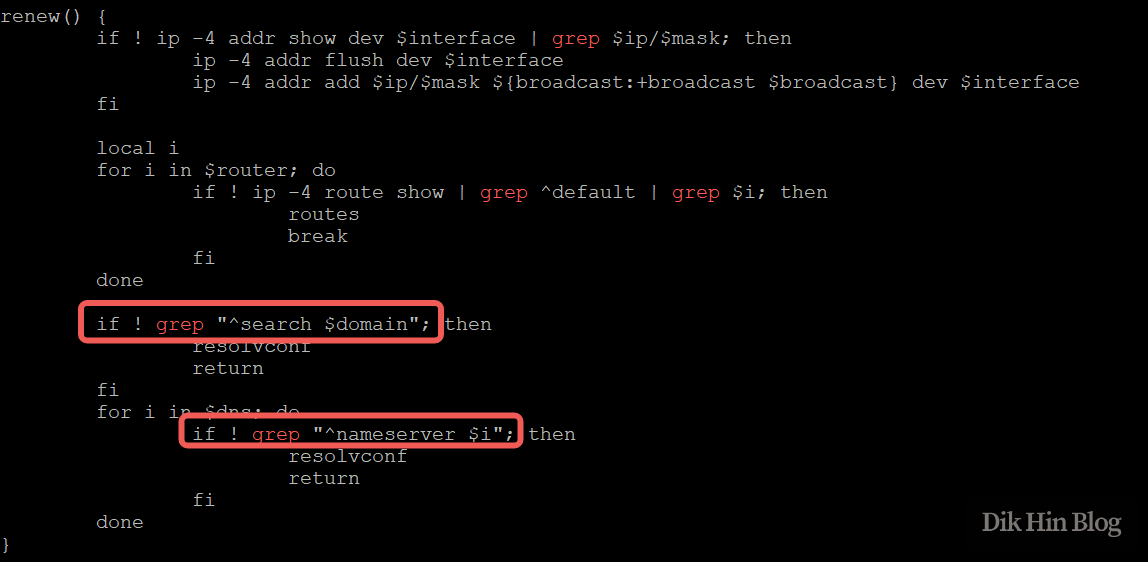
I found that grep wasn’t exiting, so I checked the script file to see how grep was being called.
Root Cause
There are two places in the renew function where grep has no input file stream. By default, grep reads from stdin, so it was stuck waiting here. Since supervisord runs udhcpc -f (foreground mode), stdin is bound to the process, causing grep to wait indefinitely. Previously when udhcpc ran in daemon mode, stdin was detached after forking, so grep would receive EOF when trying to read from stdin and exit immediately, allowing the script to continue.
This explains why manually running udhcpc worked fine, but supervisord + udhcpc -f would hang. Also, grep only exists in renew(), the first time an IP is obtained, bound() runs instead, which explains why obtaining an IP at startup works fine, but renew fails later.
Solution
Change udhcpc -f to /bin/sh -c "udhcpc -f < /dev/null"
This redirects stdin to /dev/null.
Problem solved!