Getting Multiple Dynamic Public IPs from ISP DHCP via Single Raspberry Pi
In Hong Kong, ISPs typically provide dynamic public IPs for home broadband through their modem. Modems usually have 2-4 ports, with each port being assigned an independent dynamic public IP.
Background
If I want to run multiple independent projects but don’t want to share a single ingress/egress IP (neither using NAT with port forwarding nor running on the same machine with different listening ports), I’ll need multiple public IPs. If the modem doesn’t have enough ports, the simplest approach is to connect a switch to the modem and then connect multiple devices to the switch. Since they’re all in the same L2 broadcast domain, devices connected to the switch work the same as those directly connected to the modem. However, this wastes hardware, electricity, and space, and managing multiple devices is cumbersome. There’s a better approach.
Attempting macvlan method
Using the Linux kernel’s built-in macvlan driver, I can create multiple virtual NICs on the main interface, each with its own independent MAC address. After configuration, it automatically registers an rx_handler on the main interface. When the physical main interface receives incoming packets from outside, they first enter the macvlan_handle_frame() function for preprocessing, which looks for the virtual NIC corresponding to the packet’s destination MAC address. Upon matching, it modifies skb->dev to the target virtual NIC and returns RX_HANDLER_ANOTHER, allowing the virtual NIC to handle it (bypassing the main interface’s original processing flow), ultimately entering the network stack of the namespace where the virtual NIC resides.
Docker natively supports macvlan, so I tried creating several containers with macvlan networks. In my own lab environment, udhcpc in the containers could successfully obtain IP addresses via DHCP. However, when connected to the ISP’s modem, the connection would drop as soon as udhcpc tried to get an IP from the ISP’s DHCP through the modem. After some troubleshooting, the issue was most likely that the modem limits each port to only one device (one port bound to one MAC address), so macvlan couldn’t be used.
Attempting DHCP Client Identifier method
I started researching other approaches and discovered that in the DHCP protocol, the Discover packet has an optional Client Identifier field (Option 61) used by servers to distinguish clients. This field is usually not used. My hypothesis was that as long as different client IDs are provided, even with the same MAC address, the DHCP server would treat them as different clients and theoretically assign different IP addresses.
I searched online for DHCP client software that supports custom client ID fields but found almost nothing. The few that existed could only send a single discover packet without implementing full lifecycle management. So I wrote my own Python script to implement the complete discover, offer, request, and ack flow with custom client ID support. I used Python’s scapy library to construct packets. The core code is as follows:
from scapy.layers.inet import IP, UDP
from scapy.layers.dhcp import DHCP, BOOTP
from scapy.layers.l2 import Ether
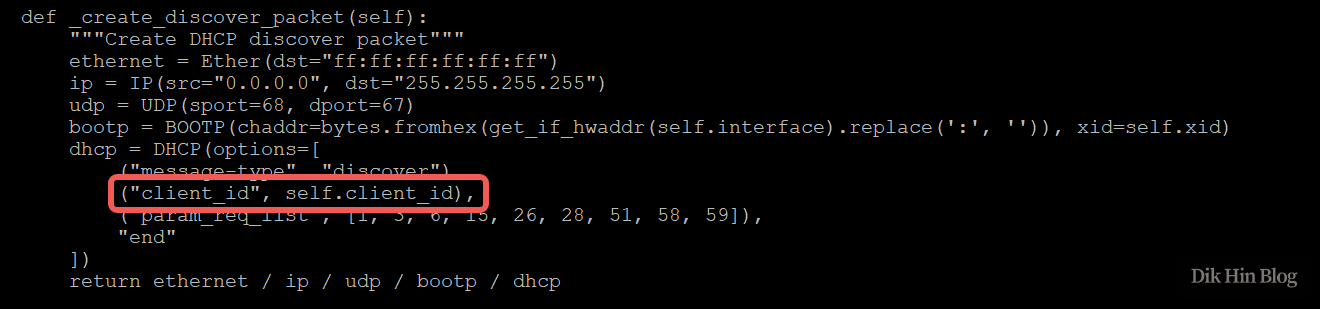
It Works!
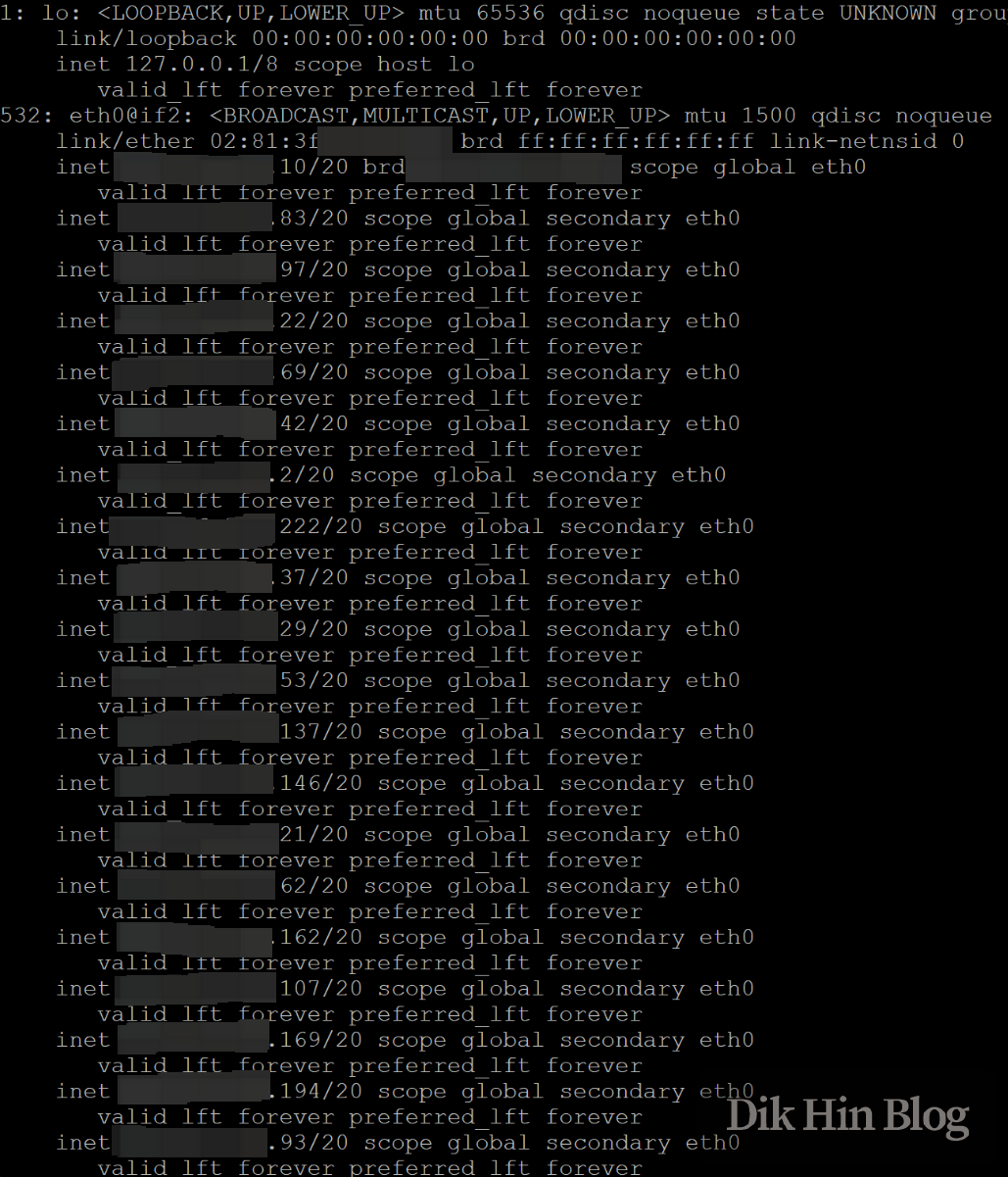
The test was successful! Using different client IDs, the ISP’s DHCP assigned me different public IP addresses, with consistent lease times (not shorter), making them stable to use. After adding the newly assigned IPs with ip addr add, all these public IPs could be used simultaneously. Additionally, as long as you renew with DHCP before each expiration, the dynamic IP won’t change, so they can essentially be treated as semi-static public IPs.
I then improved the Python script to use multiple fixed client IDs to obtain multiple fixed public IPs, with automatic renewal before expiration. Here are the logs from running for several days:

As for how to use these IPs, just add them all to the main interface with ip addr add, and they can be used simultaneously.
Container Isolation
If I need namespace isolation or want to use them inside containers, I can use the ipvlan driver’s L2 mode to bind the obtained public IPs to virtual NICs. The operating principle is similar to macvlan mentioned above, with the main difference being that ipvlan virtual NICs share the main interface’s MAC address instead of having independently assigned MAC addresses, bypassing the modem’s one-port-one-MAC restriction.
This successfully allows each project to have its own container with an independent namespace and independent public IP, all running and managed on a single Raspberry Pi.
May 2025 Update
The ISP’s system and modem appear to have been upgraded. The client ID method no longer works - with the same source MAC address, regardless of what client ID value is provided, only the same IP address is returned. However, through persistent experimentation, I discovered that the new modem no longer has the one-port-one-MAC restriction. So I switched to using macvlan instead. Since the source MAC addresses are different, the DHCP server treats them as different devices and assigns different IP addresses, and the modem no longer limits the number of devices. So it works again!